


Why travel journals stop on day three
It usually goes like this. You buy a nice notebook, or download a travel diary app, and on the first evening you write two pages about the flight and the hotel breakfast. The second evening it’s half a page. By the third you’re tired, dinner ran late, and you promise yourself you’ll catch up on the way home.
You don’t, and I don’t think it’s a discipline problem. A journal that wants an entry every evening is asking for the last hour of a long day, on holiday, when most of us would rather be out.
I’m Ferdinand, and I make Youmory on my own in Munich. I built it because I kept doing exactly this, and I wanted a record of where I’d been that didn’t depend on me sitting down to write.
How a journal can fill itself in
Youmory is built around one small habit that takes a few seconds: when you get somewhere, you check in. That’s the entry.
- 1
Arrive
Get off the train or out of the airport and open the map. Youmory looks at your location only when you ask it to, and only to work out which city you’re in.
- 2
Check in
Tap the button with the city’s name on it. There’s nothing to fill in and nothing to rate.
- 3
Keep the postcard
The city’s illustrated postcard goes into your collection with today’s date. Years from now it will still say where you were, and when.
- 4
Turn it over, if you like
Got a minute? Write a few lines on the back. No minute? The card already does its job.
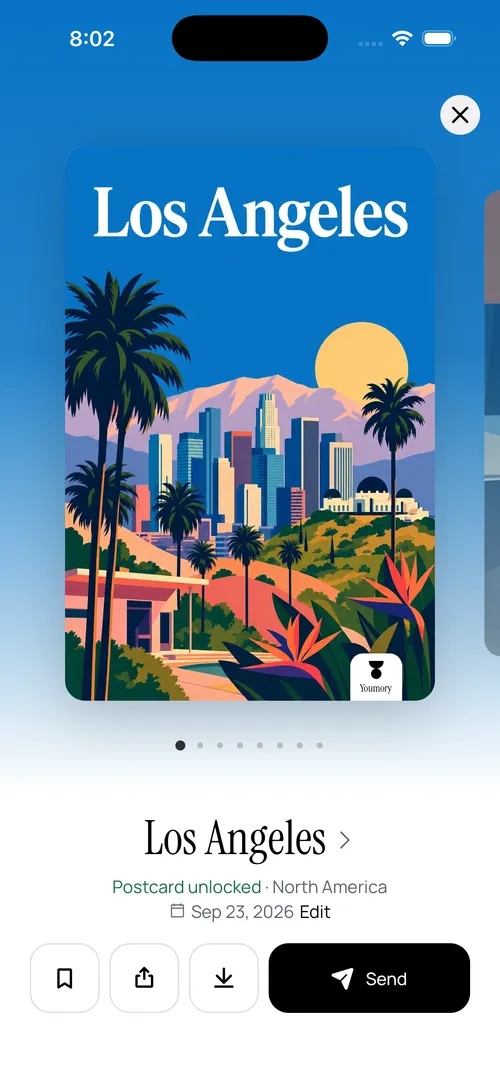
Almost 2,000 places have their own postcard so far, and you can browse all of them. If you end up somewhere that hasn’t got one yet, you can still check in, and it goes on your map with the date.






Writing is optional, and it goes on the back
Every postcard has a back. Turn it over to write a few lines in one of eight handwriting styles, draw something, or pick a stamp. Some people write a line every day. Others leave every back blank and still end up with a perfectly good record, because the front says where and the date says when.


That’s the whole diary entry for a day, and it took about as long as ordering a coffee. If you’re stuck for what to write, there’s a page about what to write on a postcard that works just as well for notes to yourself.
A travel map that counts your countries
Every check-in lands on your travel map. Youmory counts the places and the countries for you, so the question of how many countries you’ve been to finally has an answer that isn’t a guess. If you came looking for an app to track countries visited, this is the part that does it.
A timeline keeps your visits in order, and a calendar shows which weeks you were away. Been to the same city three times? Each visit keeps its own dates.

A year later, the card comes back
A year after a trip, its postcard turns up on your home screen again. It’s the closest a journal comes to reading itself back to you. You open the app to check something else, and there’s Porto, dated last October, with whatever you scribbled on the back of it.
Paper diaries do this too, when you happen to pull one off the shelf. The difference is that you don’t have to go looking.
Collections, and the cities you’re still missing
Curated collections group cities together, like the EU capitals, Alpine cities or East Asia, and show which ones you’ve collected and which you’re still missing. Nobody makes you finish them, but a gap in a row of postcards is a surprisingly good reason to look at train times.
Over a few years the collection turns into something like a travel scrapbook you never had to glue together: a card for every place, each with its date.
Sending a card to someone
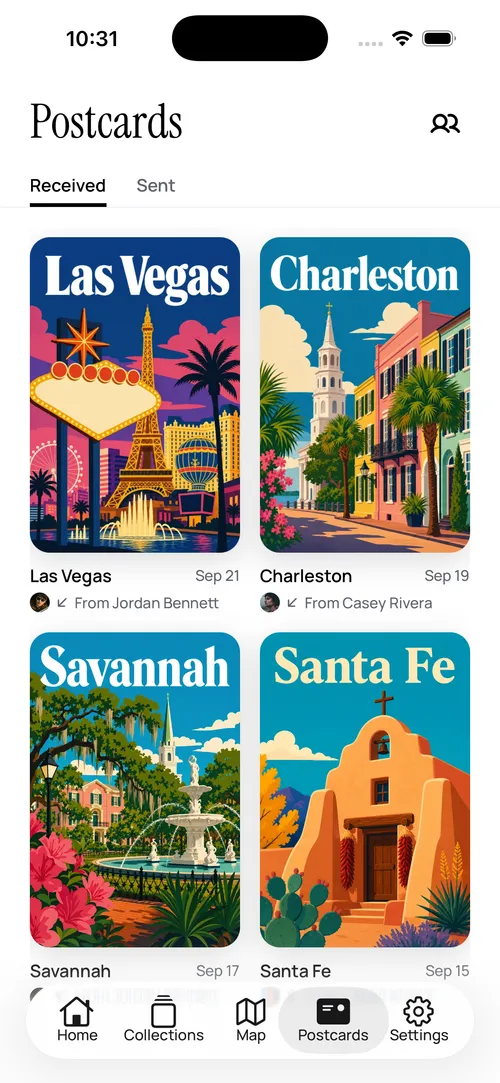
A journal is mostly for you. A postcard is better when someone is waiting for it. Write on the back of any card you’ve collected, pick a stamp, and send it to a friend in the app.


You can also share a card as a link, in a group chat or a message. Anyone can see the front without the app. To read the back they need Youmory, and whoever opens it there first gets to keep the card. And if you’d rather just post the picture, you can share the art with the place’s name underneath it.
Adding past trips (iPhone, beta)
A travel journal that starts on the day you install it leaves out everything before. On iPhone, Add your past trips looks at when and where your photos were taken and suggests trips, and you decide which ones to keep. It reads only the date and location of each photo, never the picture itself, and nothing leaves your phone. It’s still in beta, and Android doesn’t have photo import.
With Pro you can also check in from anywhere, including places you went years ago.
If you already keep a paper journal
Some people love their notebooks, with train tickets glued in and a pressed flower from a walk, and I wouldn’t try to talk anyone out of that. Youmory doesn’t replace the notebook. It does the part that tends to slip: noting, every single time, where you were and on which day.
Quite a few people do both. They check in when they arrive and write in the notebook when there’s time, and the digital travel journal fills the gaps on the days the notebook stays in the bag.
What’s free and what’s Pro
You can use Youmory as a free travel journal app for as long as you like. Free, for everyone:
- Checking in where you are and collecting that city’s postcard
- The travel map, with places and countries counted, plus the timeline and calendar
- The postcard coming back a year after the trip
- Writing on the back, sending cards to friends and sharing them as links
- Sharing the art as a picture, and the curated collections
Youmory Pro is a subscription, monthly or yearly, with a free trial. If you’d rather not subscribe, you can unlock single artworks one at a time, and anything you unlock stays yours. Pro adds:
- Checking in from anywhere, including places you went years ago
- Postcards for any city, even ones that haven’t been drawn yet: the card is made when you check in there
- Every artwork a place has, not only the cover
- High-resolution downloads, to print as a travel poster, set as wallpaper or save to your photos
- The whole stamp booklet and every pen
Prices depend on your store and country, so I won’t quote them here.
About the artwork
The postcard artwork is generated with AI. Each place has a cover card, and the bigger cities have more, mixing the views everyone knows with smaller things: a plate of food, a tram, a street sign, a door.

Your location and your data
Youmory checks your location only when you ask it to, to find out which city you’re in. It doesn’t track you in the background. You don’t need an account to start; sign in with Apple or Google if you want your collection to follow you to a new phone. There are no ads, and personal data isn’t sold. The help page answers the rest.
Choosing a travel journal app
The best travel journal app depends on what you want to end up with. If you want long entries with photos laid out day by day, an app built for writing will suit you better than Youmory does. If you want a record you’ll actually keep, with very little effort on the road, that’s what Youmory is for.
I’ve written an honest comparison of the best travel journal apps, Youmory included, if you’d like to see the alternatives side by side.
Questions
Is there a free travel journal app?
Youmory is free to download and use. Checking in, collecting each city’s cover postcard, the travel map with your countries counted, writing on the back and sending cards to friends cost nothing. Pro is optional and adds every artwork, checking in from anywhere and high-resolution downloads.
Do I have to write anything?
No. Checking in is the entry: the postcard carries the place and the date. The back is there for the days you feel like writing.
Does Youmory work offline?
Checking in needs your location and a connection, because the app has to work out which city you’re in. If you arrive somewhere without signal, check in once you have one.
Can I add trips I took before I had the app?
Yes. On iPhone, Add your past trips (beta) suggests trips from the date and location of your photos, without looking at the pictures, and nothing leaves your phone. With Pro you can also check in from anywhere, including places you went years ago.
Is Youmory on Android?
Yes, Youmory is on iPhone and Android. The one difference is photo import for past trips, which only the iPhone app has.
How does Youmory count the countries I’ve visited?
Every check-in goes on your travel map, and Youmory counts the places and countries from those check-ins. A timeline and a calendar keep the visits in order.
Does Youmory track my location?
No. It checks your location only when you ask it to check you in, and there’s no background tracking. There are no ads either.